- Author
![]()
![]()
- CategoryStory
- Last Updated21.05.2026
- Reading time5 minutes


External collaboration in Microsoft 365 is facing an important change: Microsoft is gradually retiring SharePoint One-Time Passcode authentication and moving to Microsoft Entra B2B guest accounts, no later than August 31, 2026.
What initially looks like a technical change has broad implications for IT, security, and compliance. External users will now be managed as guest accounts in Microsoft Entra ID.
This brings more transparency and security, but it also creates a new challenge: every guest account must be managed throughout its full lifecycle.
From temporary access to managed guest accounts
Until now, external users in Microsoft 365 could access shared content via a one-time passcode. It was simple and fast, but offered limited control.
With Entra B2B, external access is integrated more deeply into central identity and security processes. Guests can be governed through Conditional Access, MFA, Identity Governance, and additional policies.
From a security perspective, this is progress. At the same time, however, the number of managed guest accounts increases, along with the need for clear ownership, regular reviews, and a defined lifecycle.
Governance challenges with external users
Creating a guest account is rarely the real problem. The critical part starts afterward:
- Who is responsible for the guest?
- Is access still required?
- What happens when a project ends?
- Who removes external users again?
Without clear processes, orphaned guest accounts appear quickly. External users remain active even though collaboration ended long ago. IT teams lose visibility, compliance teams lack evidence, and business teams often do not know which guests still have access.
At the same time, external collaboration must not become unnecessarily complicated. Business teams still need to work quickly with partners, customers, suppliers, or consultants.
This creates a clear tension: external collaboration should remain easy, but become more controlled.
Delegated guest management with EasyLife 365 Collaboration
EasyLife 365 Collaboration helps organizations delegate guest management to business teams in a controlled way, without IT, security, or compliance losing control.
IT defines the central rules:
- Who is allowed to invite guests?
- Which approval workflows are required?
- Which security policies apply?
- When must guests be reviewed?
- What happens if nobody responds?
Execution happens where the need arises: in the business team.
Users can request or invite guests through a guided self-service process. If required, an approval workflow is triggered automatically. After approval, guest accounts are created and external users receive their invitation.
This keeps external collaboration fast, but governance-compliant.
Practical example: Securely onboarding external consultants to Microsoft Teams and SharePoint
An internal project team works short-term with three external consultants. They need access to a Microsoft Team and selected SharePoint documents.
Current limited process without EasyLife 365
- The internal employee sends a ticket to IT requesting creation of guest accounts.
- IT manually checks whether the request is valid, creates the accounts, and assigns permissions.
- Depending on IT workload, this process takes one to three days.
- After collaboration ends, the internal employee forgets to inform IT, and the guest accounts remain active.
- Months later, a compliance audit reveals numerous orphaned guest accounts in the tenant.
- In the worst case, business teams bypass the process entirely and share documents directly by email, resulting in lost control over sensitive content.
New process with EasyLife 365 Collaboration
- The internal employee opens the EasyLife 365 app in Microsoft Teams and requests creation of guest accounts.
- If configured, an approval workflow is triggered, for example by a manager or a compliance owner. Alternatively, the employee can confirm that specific prerequisites are met, such as an NDA being in place.
- After approval, guest accounts are created automatically and the external consultants receive their invitation.
- The effort is reduced to a few minutes or hours, depending on the selected approval depth.
- After a defined period, for example 90 days, the internal owner (sponsor) automatically receives a reminder: "Are these guests still needed?"
- The internal employee confirms or removes the accounts with one click.
- If there is no response, the accounts can be automatically deactivated after an additional grace period.
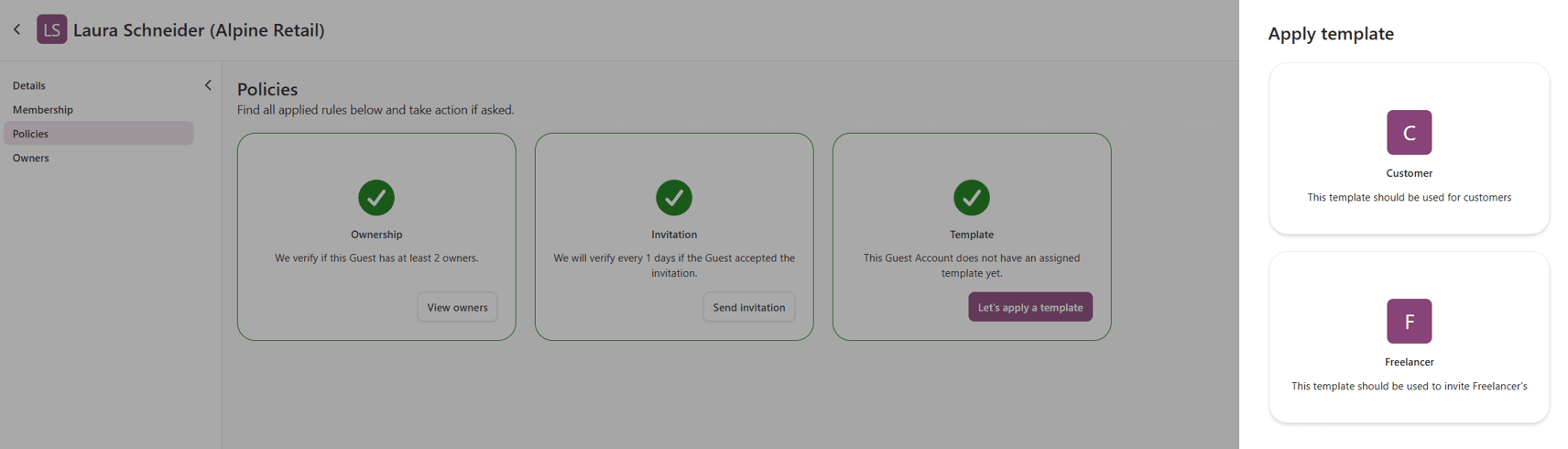
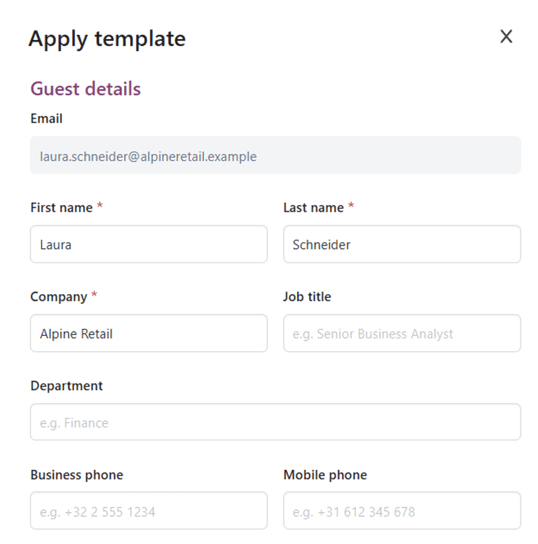
|
|---|
| Add a guest account with EasyLife 365 Collaboration. |
The benefits of modern Entra B2B governance
- Faster external collaboration without an IT bottleneck
- Automated lifecycle management instead of manual follow-up
- Audit-proof documentation for compliance requirements
- Reduced IT workload with higher governance quality
EasyLife 365 Collaboration combines self-service for end users with centralized control by IT, security, and compliance.
Why organizations should prepare for Entra B2B governance now
The transition to Entra B2B is more than a technical change. It changes how organizations must manage external users in Microsoft 365.
Those who wait until shortly before the deadline risk unclear responsibilities, growing guest account inventories, and operational issues in external collaboration.
Organizations should therefore establish processes early to ensure external users can be invited securely, reviewed regularly, and removed when needed.
Conclusion: Guest management becomes a governance responsibility
The Entra B2B requirement for SharePoint and OneDrive makes external collaboration more secure and transparent. At the same time, guest management becomes more of a governance responsibility. EasyLife 365 Collaboration helps organizations solve this challenge in a structured way through delegated guest management, automated access reviews, and central visibility. This turns a Microsoft change into more than a technical project, it becomes an opportunity to make external collaboration sustainably safer and easier to control.
Written in collaboration with our Partner suXess IT, an IT consulting and management company specializing in digital transformation, IT governance, cloud-native platforms, Microsoft 365 collaboration solutions, and compliance-focused IT services. With more than 20 years of experience, the company helps organizations modernize and manage complex IT environments while meeting regulatory and security requirements.


